
MetaTrader 5 Trade Journal
Automatic sync. Full history. Built for MT5 traders.

Track, analyze, and improve.
Connect in Minutes
Connect your terminal once. No exports, no copy-paste, no maintenance.
Trades Sync Automatically
New trades appear in your journal the moment they close, mobile app included.
Your Full History, Not 30 Days
Add an account and Tanto imports every trade back to its first, not just the last month.
All Your Accounts, One View
Every MT5 account you log into shows up ready to add. Live, demo, evaluation, funded.
Forex & CFD Analytics
PnL calendar, trade reports, and MFE, MAE and Captured % that show how you managed each trade.
Journal Every Session
Add notes, charts, and context. Global economic events are already there.
Your MetaTrader 5 Dashboard
Every MT5 account feeds into one dashboard. Cumulative P&L, win rate, reward/risk, and the numbers that matter for improving your trading.

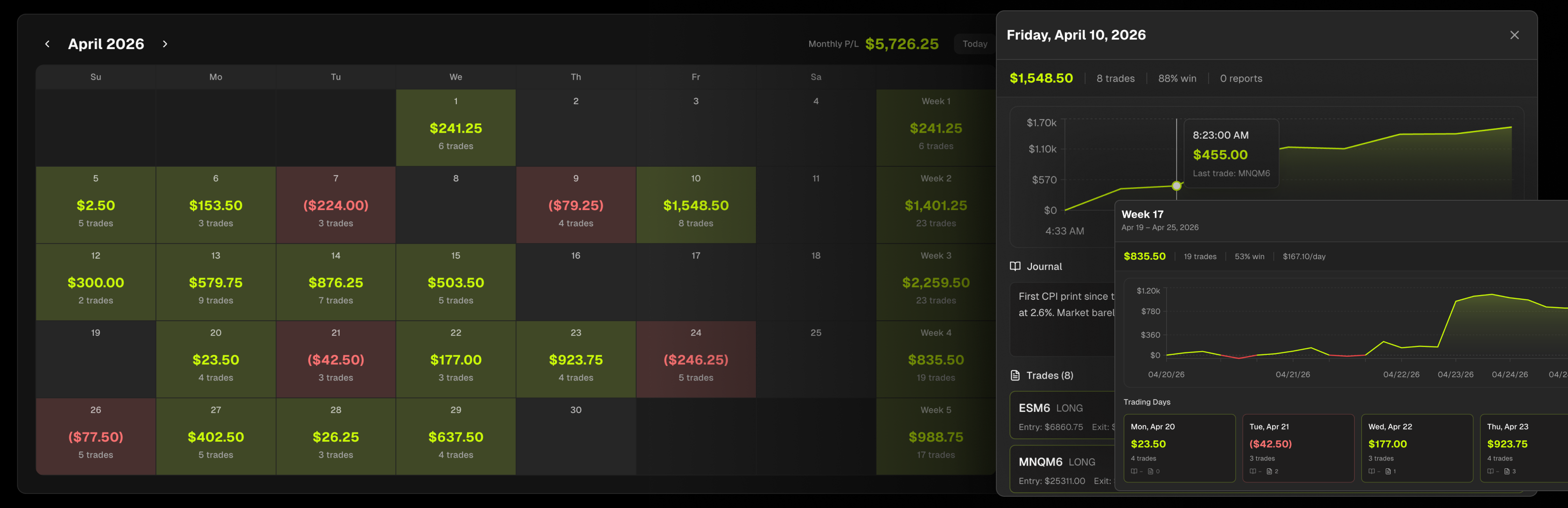
Your Month at a Glance
Green days, red days, streaks and slumps. Click any day to drill into the trades and journal notes. Weekly and monthly totals keep you accountable.
Grade Every Trade
Grade every trade A–F and rate your execution. Document entry and exit reasons, market conditions, and emotional state. Tag setups and filter to find what works.

Journal Every Session
Write your pre-market plan before the open. Review after the close. Economic events pull in automatically so you never miss context.

The Trading Journal for MetaTrader 5 Traders
MetaTrader 5 is the most widely used trading platform in the world, offered by brokers like Pepperstone, IC Markets, and FP Markets. Prop firms like FTMO, FundedNext, Funding Pips, and The5ers run funded programs on it. If you trade forex and CFDs through any of them, Tanto syncs those executions into your MT5 trade journal automatically.
Setup takes a few minutes and you only do it once. The connection is read-only and there is no investor password to hand over. Open your Day Journal before the session and economic events are already loaded. As you trade, positions appear within seconds of closing, including the ones you place from the mobile app. Use slash commands to pull specific trades inline as you write. Grade each execution A through F in your Trade Reports, tag setups by strategy, and record exactly what you saw and what you would do differently. The review happens while the session is still fresh.
One setup covers every MT5 account you run. Connect live accounts, evaluations, and funded accounts side by side in a single MT5 prop firm journal, set per-account commissions for accurate net P&L, and track everything in one place. Adding an account imports its full history back to the very first trade, not just the last 30 days, so your win rate and your drawdowns are built on everything you have ever traded.
MetaTrader 5 Integration FAQ
Tanto connects to your MT5 desktop terminal with a read-only connection. Setup takes a few minutes and you only do it once. From then on, completed trades flow into your journal on their own, with no exports and nothing to maintain.
Within seconds of closing, while your terminal is open. Trades you place from the MT5 mobile app sync too, because they land in your terminal history.
All of it. When you add an MT5 account, Tanto imports your full history back to the account's first trade, not just the last 30 days.
Only for trades to sync in real time. If your terminal is closed, nothing is lost. Your history lives at your broker, and Tanto catches up automatically the next time you open MT5.
No. The connection is strictly read-only. Tanto reads your trade history and open positions, and it cannot place trades, cancel orders, or move funds.
No. Tanto connects through your terminal, so there is no account password or investor password to hand over.
Yes, as many as you need. Any account you log into on that terminal appears in Tanto ready to add, and live, demo, evaluation, and funded accounts sit side by side. Track them separately or roll them up together.
Any of them. Because Tanto connects to your terminal rather than to a specific broker, every MT5 broker and prop firm works, including FTMO, FundedNext, The5ers, Funding Pips, Fintokei, Pepperstone, IC Markets, and FP Markets.
Yes. Set your per-lot fees on each account so your P&L reflects what you actually keep.
Every completed trade with timestamps, prices, volumes, and P&L in your account currency. From there Tanto generates MFE, MAE, and Captured % on every trade, and charts your entries and exits against price.
Yes. Export a history report from the MT5 terminal and upload it. Use auto-sync, uploads, or both.
Trade Journals for Every Platform

cTrader Trade Journal
Real-time sync for cTrader forex and CFD accounts with full execution detail.

Interactive Brokers Trade Journal
Auto-sync stocks, options, forex, and futures from Interactive Brokers into one journal.

NinjaTrader Trade Journal
Connect NinjaTrader and journal every futures and forex trade automatically.