TradeZella Alternative for Prop Traders: Cheaper and Faster
11 min read
If you searched for a TradeZella alternative as a futures or prop firm trader, the friction usually comes down to cost and workflow. TradeZella's new pricing starts at $35/month for a single account, and trading more than one account means the $59/month Pro plan. Synced accounts refresh every 3 hours. This guide is for futures and prop firm traders running several accounts who want a journal that costs less, syncs within seconds, and is built around how prop traders actually review.
What TradeZella Offers (and Where It Stops)
As of July 14, 2026, TradeZella has three plans for new subscribers. Existing customers who signed up earlier keep their old price as long as they stay on the same plan.
Plan | Monthly | Billed annually | Active accounts |
|---|---|---|---|
Essential | $35 | $26/month ($315/year) | 1 |
Pro | $59 | $44/month ($531/year) | 50 |
Ultra | $99 | $74/month ($891/year) | Unlimited |
Trade Replay, AI, and Backtesting
Trade Replay plays back your actual trades on real market data, like a recording of your session: price unfolds second by second, your buys and sells appear where they happened, and you can replay a whole day's trades together. Backtesting is the opposite: you scroll through historical charts and place simulated trades to test a strategy. These are TradeZella's flagship features, and the best versions sit on the higher plans. Essential gets 10 replays a month and no 1-second replay chart. AI agents (auto-tagging, session review, game plan) and automated backtesting start at Pro, and unlimited mentor invites need Ultra.
Broker Coverage and Sync Timing
TradeZella offers Auto Sync for Tradovate, NinjaTrader, Interactive Brokers, Rithmic R Trader, TopstepX, and a long list of stock and forex brokers. Per TradeZella's help center, synced accounts re-sync automatically every 3 hours, with a manual re-sync available every 15 minutes. The advertised 500+ broker count is mostly MetaTrader 4 and 5 forex brokers running on the same MT engine.
Where It Stops for Prop Firm Traders
TradeZella added Rithmic and TopstepX auto-sync in 2026, so connecting is no longer the problem. Two things still get in the way for prop traders:
The account limit. Essential covers one active account. Most prop traders run several evaluations and funded accounts at once, which puts them on Pro at $59/month.
The timing. During the session your journal runs up to 3 hours behind your platform unless you keep pressing re-sync, and that's the window when reviewing a trade is most useful.
TopstepX auto-sync also needs Topstep's paid API subscription, which is true for every journal, Tanto included. For a journal-by-journal breakdown, see which trading journals work with Topstep. PropFirm Sync, TradeZella's prop firm dashboard, is a separate feature that tracks evaluation fees, resets, and payouts. It doesn't import your trades.
Here's how the futures and prop firm rails compare:
Connection | TradeZella | Tanto |
|---|---|---|
Tradovate | Auto Sync (every 3 hours) | Within seconds |
Rithmic | Auto Sync (every 3 hours) | Within seconds |
TopstepX | Auto Sync (paid Topstep API required) | Within seconds (paid Topstep API required) |
NinjaTrader | Auto Sync (every 3 hours) | Within seconds |
Interactive Brokers | Auto Sync (every 3 hours) | About every 10 minutes |
History on first connect | Up to 180 days for Rithmic | Last 30 days, older trades by file upload |
What a Strong TradeZella Alternative Looks Like
If you're a futures or prop firm trader, these are the criteria worth checking before you sign up for anything that claims to be better than TradeZella:
Pricing that fits several accounts. Prop traders rarely journal one account. Check what the plan costs at the number of accounts you actually run, not the entry price.
Sync fast enough to review during the session. Rithmic, TopstepX, and Tradovate cover most futures prop firms. A journal that refreshes every few hours is a post-session tool, not an in-session one.
Risk tracking that doesn't slow you down. R-multiples are only useful if recording risk takes seconds, not a form for every trade.
Per-account stats with multi-account roll-up. You should be able to view a single combine in isolation, then switch to All Accounts for the big picture.
A way to hide trades without deleting them. Practice trades, fat fingers, accidental fills on the wrong account: you want them out of stats but still on record.
Commission tracking that actually adjusts P&L. Per-contract round turn for futures, configurable per account, applied across every chart and report.
Why Tanto Works for Futures and Prop Firm Traders
Tanto is built around the brokers and prop firms futures traders actually use, at a price that holds up when you run several accounts.
Less Than Half the Price for 1 to 5 Accounts
Accounts you trade | Tanto | TradeZella |
|---|---|---|
1 | $13.99/month ($11.19 billed annually) | $35/month ($26 billed annually) |
Up to 5 | $24.99/month ($19.99 billed annually) | $59/month ($44 billed annually) |
Up to 50 | $39.99/month ($31.99 billed annually) | $59/month ($44 billed annually) |
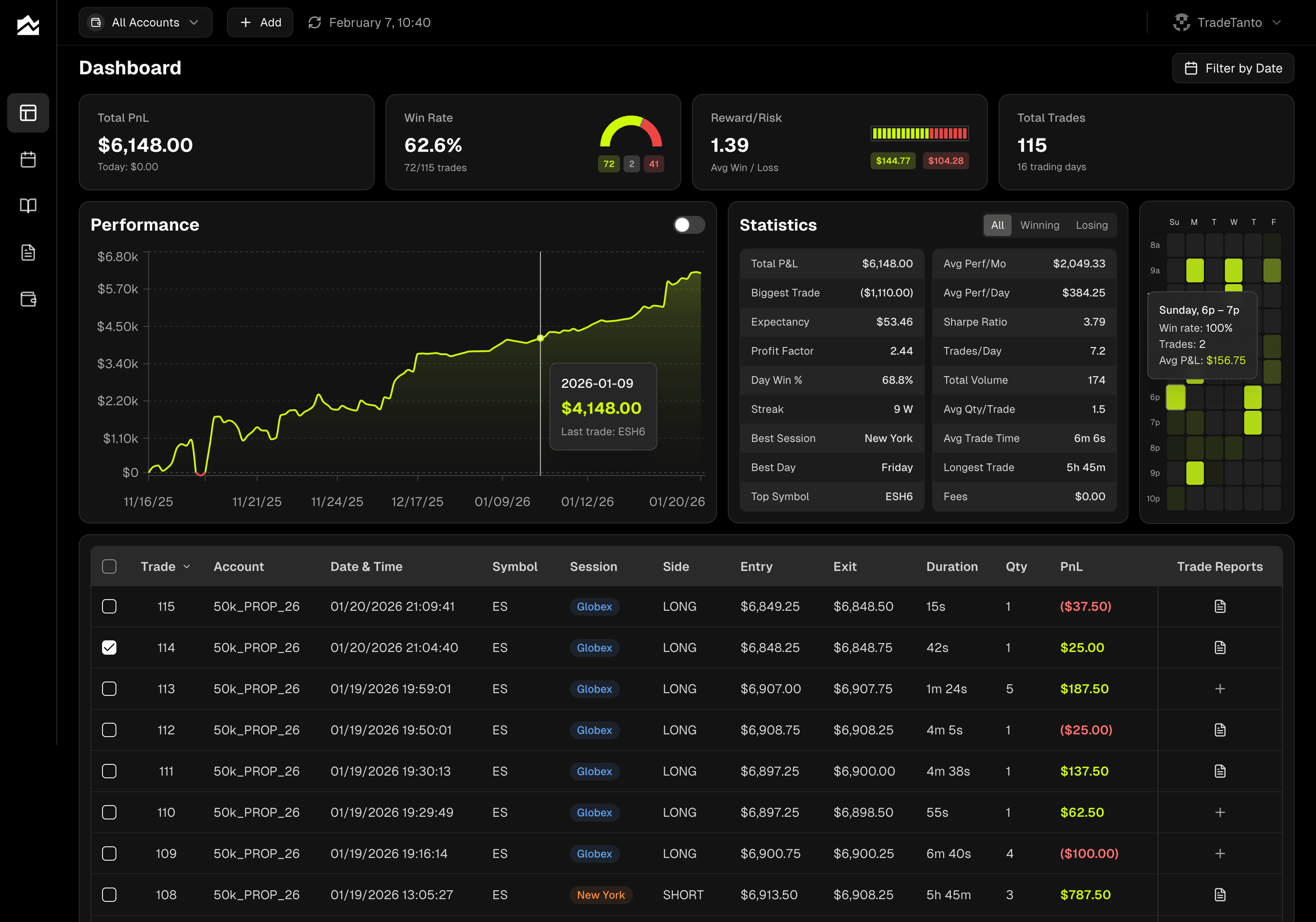
Every Tanto plan includes automatic trade sync, the full analytics dashboard, trade reports, the PnL calendar, and the Day Journal. The plans differ by how many accounts you connect. See the pricing page for details.
Trades Sync Within Seconds
No 3-hour wait, no manual re-sync. Connect Tradovate, NinjaTrader, cTrader, or Rithmic once and new fills show up within seconds. That includes Rithmic-based prop firms. When you connect Rithmic, you pick your firm from the dropdown (Apex, Earn2Trade, Bulenox, and others) and use the credentials your firm provided. TopstepX trades also sync within seconds, and syncing doesn't sign you out of TopstepX. Interactive Brokers syncs roughly every 10 minutes. The dashboard updates as trades arrive, so the equity curve and stat cards reflect what just happened, not what your last sync window happened to catch.
Risk and R-Multiples Without the Busywork
Both TradeZella and Tanto track R-multiples. The difference is how little typing Tanto asks of you.
Default risk per account. If you size every trade to a fixed dollar risk, set it once on the account and every trade gets an R automatically. When you size up, add a new amount from a date forward, and your earlier trades keep their original risk.
Risk tied to your setups. Attach a risk amount to a setup, and tagging a trade with that setup fills in its risk for you. Journaling a busy session takes a fraction of the time.
Stops in whatever unit you think in. Type the stop in points, as a price, or as a dollar amount. Tanto stores the exact price level either way.
The whole app in R. One switch turns every dollar figure into R: the dashboard, the calendar, every report, and MAE and MFE on each trade.
Every Trade on a Chart, Measured
Both journals track MAE and MFE. Here's how Tanto puts them to work:
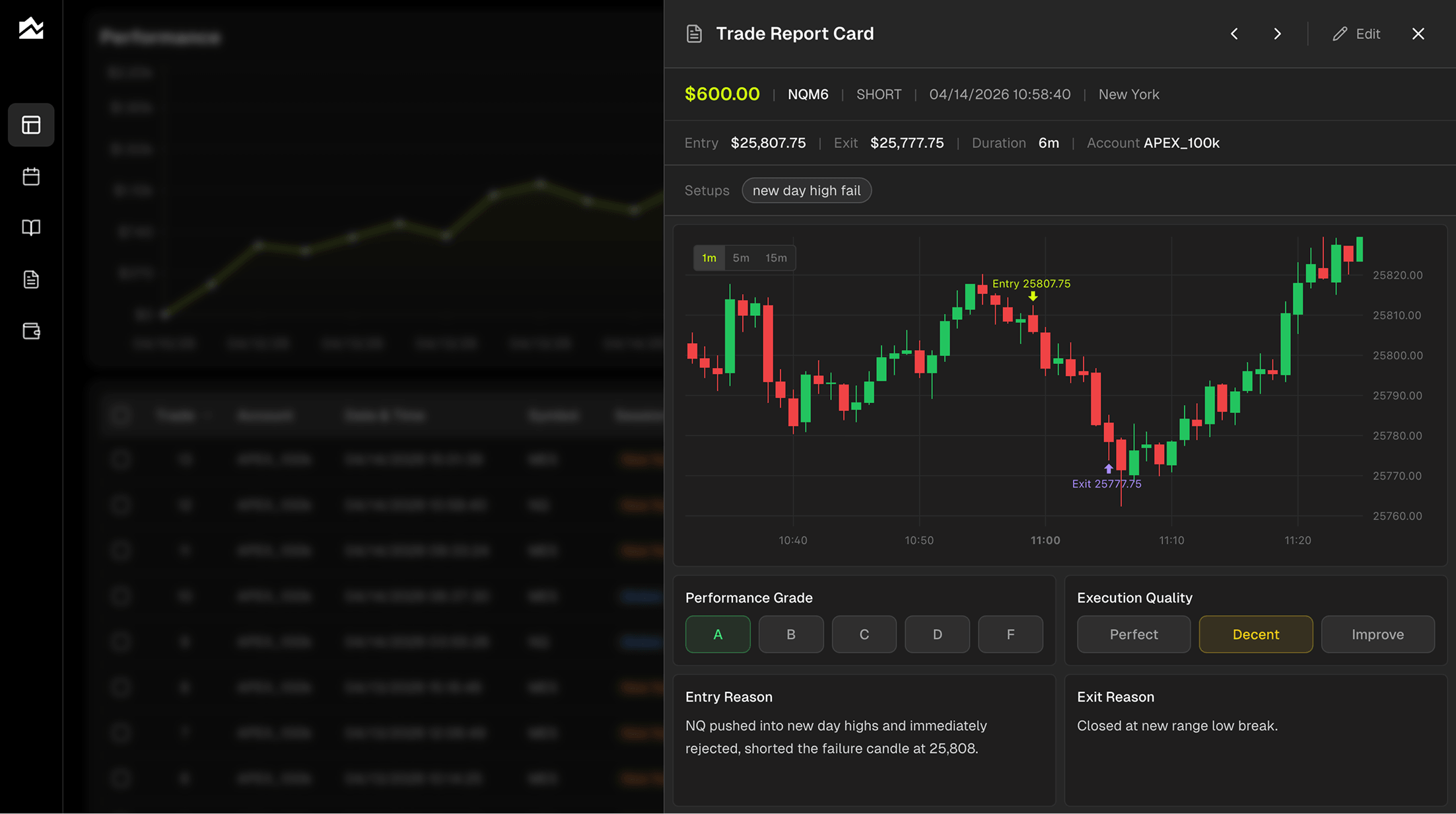
Entries and exits on the chart. Each closed trade on ES, NQ, CL, GC and the other major futures contracts opens on a candlestick chart with your entry and exit marked right on the candles.
MAE, MFE, and Captured %. Under every chart: how far the trade went against you, how far it ran in your favor, and how much of that move you actually kept. Captured % is where early exits show up.
Scale-ins grouped into one trade. Turn on Group trades by position and a trade you built in three entries and closed in two exits reads as one trade from flat to flat, so your win rate and averages reflect positions, not fills.
Grade Every Trade, Not Just Every Result
Every trade gets two scores. A performance grade (A through F) for the outcome, and an execution rating (Perfect, Decent, Needs Work) for whether you actually followed your plan. An A-grade losing trade is more useful than a D-grade winner, and separating the two is how you stop confusing process with luck. Tag setups, log emotional state, write what you'd do differently. Filter your trade reports by grade or tag to find the patterns hiding in 200 trades.
Plan the Day, Then Review What Actually Happened
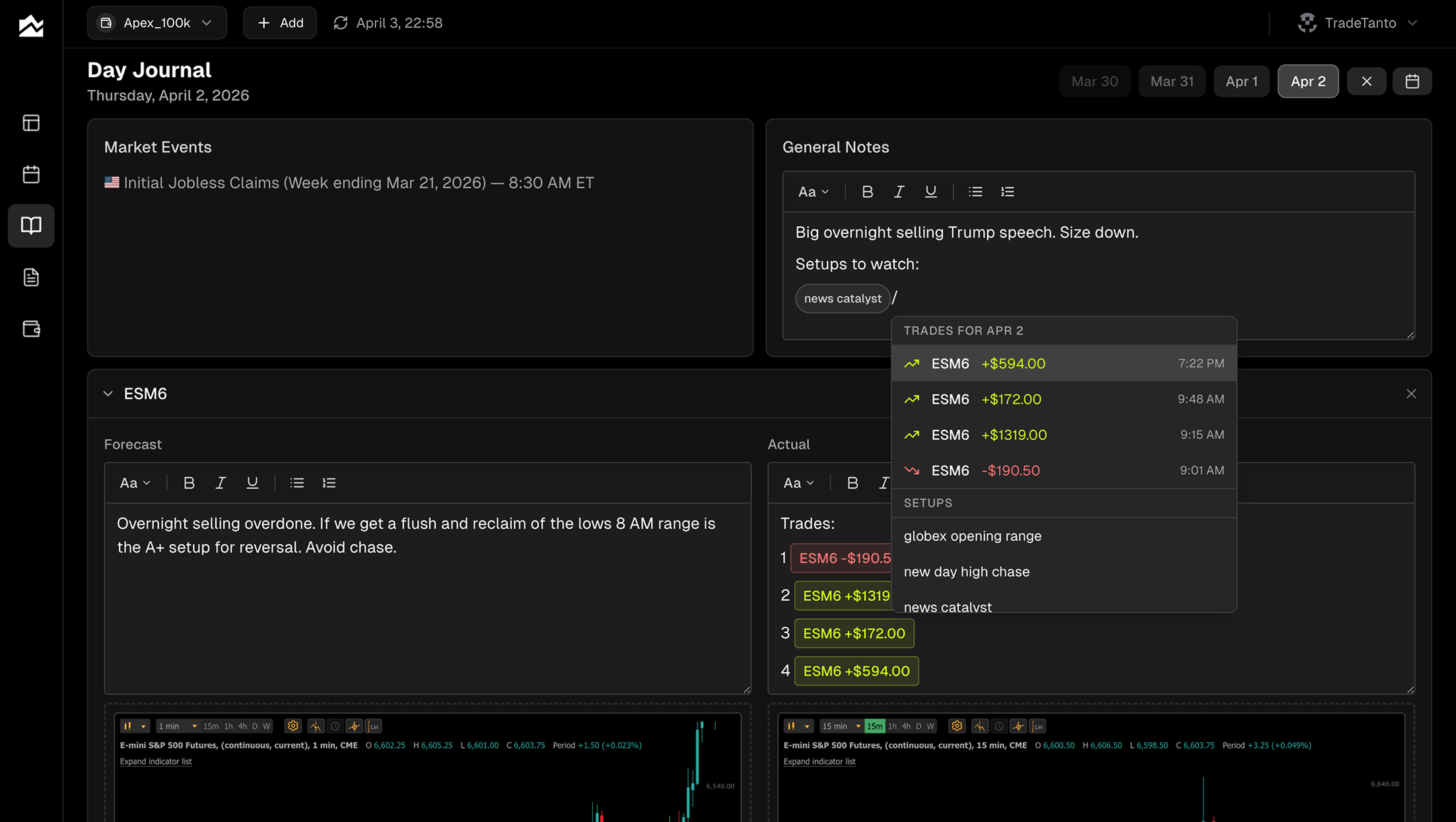
The Day Journal pairs a Plan column with an Actual column for each instrument you watch. Write your read before the open, then come back after the close and compare. Economic events for the day are listed alongside your notes, so you remember what was moving the market. Slash commands pull specific trades and setup tags into the entry. Paste charts inline. The plan/actual split is one of the fastest ways to find the gap between what you planned and what you traded.
See the Month at a Glance
The PnL calendar shows your whole month in a grid, color-coded green and red by day. Click any day to see trades, notes, and the intraday equity curve. Click any week's summary to see the cumulative P&L for the week with a stats breakdown. The point isn't the visualization, it's the recognition: most traders find their best and worst days fall into patterns they hadn't noticed until the calendar made them obvious.
Multi-Account Workflows for Combines and Funded Accounts
The account selector in the top bar filters the entire app (dashboard, calendar, journal, reports) by a single account, a group of accounts, or All Accounts. Run three combines and a funded account at the same time? Each one gets its own stat cards, its own equity curve, its own win rate. Hidden trades stay out of stats without being deleted, useful when you want a clean view of your funded account separate from your evaluation noise. Per-account commission tracking means a $1.40 round turn on one prop firm and a $0.85 round turn on another both compute correctly.
Other Options Worth Knowing About
A few alternatives that solve different versions of the problem, depending on what you actually need:
TraderSync. Closest to TradeZella in shape, with broker auto-sync, AI-driven pattern reports, and trade simulation. Stocks and options traders who want a TradeZella replacement with broader forex broker coverage and a free tier worth trying often land here.
TradesViz. Built for futures and multi-asset traders who want depth over speed. The pivot grid analytics, the AI Q&A on your trade history, and 400+ dashboard widgets do things most journals don't. Its auto-sync runs once a day, so it suits traders who review after the session rather than during it.
Chartlog. A US equity day trading journal with TradingView charts on every trade. No futures, no forex, no crypto. If you trade stocks through a supported broker and you want clean visual review more than anything else, Chartlog is built around that exact use case.
Who Should Stay on TradeZella
A TradeZella alternative isn't the right call for everyone. If most of these describe you, the switch isn't worth it:
You signed up before July 14, 2026 and your locked-in price still feels fair.
You review after the session, so a 3-hour sync never gets in your way.
You trade primarily stocks or options through Schwab, thinkorswim, Webull, or TradeStation, where TradeZella's auto-sync already works.
Trade Replay with the 1-second chart is your main learning tool, and you're on Pro or Ultra to get it.
You lean on Zella AI, the AI agents, or automated backtesting as part of your routine.
You use Zella University and the trading community, or run formal mentor relationships.
Your prop firm spending is the thing you wanted to understand, and PropFirm Sync's fee and payout tracking actually solves that problem for you.
If TradeZella is doing what you bought it for and the price feels fair for the value you're getting, switching is friction without payoff. The case for an alternative is strongest when the subscription math or sync timing actively hurts; if neither does, stay put.
Migrating Away from TradeZella
A clean migration takes about 30 to 45 minutes. The process is straightforward but a few things won't transfer perfectly.
Export your historical trades from your broker or platform rather than from inside TradeZella, since TradeZella's own data export isn't fully self-serve. In Tanto, click the + button, select Upload CSV, and pick your platform. The importer takes Tradovate, NinjaTrader, TopstepX, R|Trader Pro, and Quantower CSVs, cTrader and MetaTrader 5 XLSX files, and more, and the upload pane tells you exactly which file to export. Re-uploading the same file is safe, since duplicates are skipped.
What might not transfer cleanly: trade tags and grading. Those live inside TradeZella's database and don't come out in a typical broker export. If grading specific historical trades matters, plan to spend an evening going through your top 50 most-traded setups and re-tagging in Tanto. After that, connect auto-sync for your live brokers and prop firms and the manual exports stop. If you connect auto-sync after uploading, keep your uploaded files to dates before you connected so the two don't overlap.
Bottom Line
If you run several prop firm accounts through Rithmic, TopstepX, or Tradovate, Tanto costs less than half of TradeZella at 1 to 5 accounts, syncs within seconds instead of every 3 hours, and keeps risk tracking down to a tag or a default. TradeZella still fits the trader who reviews after the close, values Trade Replay, Zella AI, and Zella University, or kept an early price. Pick the one that matches how many accounts you run and when you review. Start with Tanto's pricing page or browse the full integrations list to see if your broker is covered.
By Team Tanto · Last updated: October 11, 2026